Sunday, November 12, 2006

Performancing For Firefox : Review and How to install

PS: Since IIIT Network does not seem to be coming back to normal, contrary to what is claimed here, so you can help me by trying out this.

Hey, right now I am blogging straight away from my browser using Performancing For Firefox or PFF in short.

Performancing for Firefox is a full featured blog editor that sits right in your Firefox browser and lets you post to your blog easily. You can drag and drop formatted text from the page you happen to be browsing, and take notes as well as post to your blog.

Get the PFF extension from here. Blogger beta users should install the latest version(1.3.5 Beta 3) from here or you will have troubles. Learn to set it up from here. Remember that Blogger beta users should give their google username(e.g. bla@gmail.com) and password when asked.

Now lets have a look at the features. This is the list of features that I got from performancing's home page.

Features

  • Full WYSIWYG and source editing
  • Save as Notes
  • Add all your various blog accounts
  • Technorati Support
  • Delicious integration
  • Trackback support
  • Draft support
  • Ping support
  • Image upload and FTP
  • Metrics stats
In order to copy the above features I just used another cool feature thats not mentioned in the above list. Just selected the feature list and did drag-n-drop. And it got placed here with all the formatting! Now lets see whether its also possible to drag-n-drop images.


O.. Yes. It works. Now I got to see whether it will get posted to blogger nicely or not. That I could only see after I post. So wait.[EDIT: Seems like it does not get uploaded. This is the only thing of blogger that PFF is unable to support.]

Now lets label it using the categories tab on right hand side and see whether its converted to blogger beta labels(after I post).[EDIT: Yes]
Also provides technorati tagging. No need of any bookmarklet now.

The bookmarks tab aka del.icio.us integration seems useless. It just provides link to all your bookmarks, which you can directly see in browser also. Ya... One use is that you can automatically bookmark all your post. Check the checkbox on option on right hand side for that.

Lets also try the trackback support. Lets put a link to my shaastra seo contest blog to check it. It is great boon to blogger users as blogger does not sends trackback pings.(EDIT: Does not seem to work, may be I missed something :( )

The pinging(not the trackback one) support is also cool. Blogger pings only weblogs.com. PFF allows you to ping more than 20 services using Ping-O-Matic, PingoAt.

One of the most important thing is that it provides more space to the editor window than what is provided by blogger. Also writing offline is much faster than editing in blogger's editor. May be thats why I could write such a long post :) [EDIT: One thing that I missed is editing of a posted blog. They claim somewhere that you can do that. But I couldn't.]

Technorati Tags: , , , , , ,

Thursday, October 26, 2006

So its true - Google is intelligent and it penalises you if you try to be oversmart

Google has blocked almost all the sites that were participating in the Shaastra Google SEO Event, including mine :( Now if you search for the keywords Shaastra Thamesportal Zalecenia Autophytes Invernesshire on google, you will find blogs that have just one or two posts, blogs that have been started but never taken care of, and blogs that are not at all participating in this contest!!
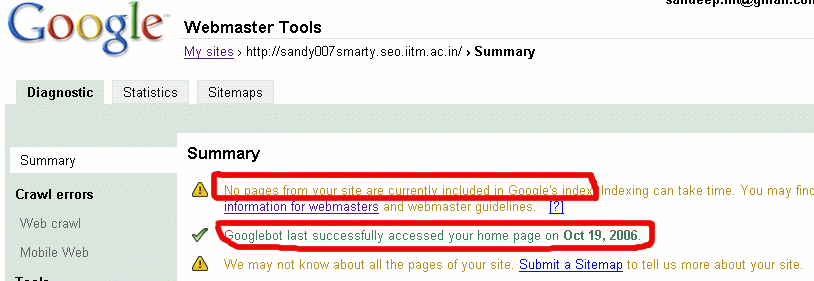
Yes ... a big blow to all those who have been trying so hard for over a month now. Here is a screenshot from my google webmaster page that clearly shows that google has removed all my pages from its index:-

You can also see it was last indexed on 19th Oct,2006. That was when my page achieved the top spot. You can still see the cached page here. But now, its banned......... :(

My dream of SANDEEPs winning this contest is shattered :(
Now I understand. Google, you are intelligent.
Ohh... I forgot to mention why has it been banned. It is banned because of Keyword Spamming. One-tenth(not sure) of the words on my blog were just the keywords. With such a high keyword ratio, how can it go undetected by the search engine giant Google? I knew that Google penalises you for keyword spamming. But I had to do this because the contest had not left much options.
1. You had to host your blog in their domain and you were not allowed to use keywords in your domain name.
2. There was not any control over the template other than choosing another template.
3. This also means no control on meta tags like keywords, description, etc.
4. And many may suggest getting links was a good option. But PR does not changes so quickly. Also it takes time before you come out of the google sandbox. This contest had only allowed you one and half months and now only 4 days are left. Till now, no blog participating in this contest has a PR greater than zero.

So contestants were left with no other option that blatant keyword spamming. All those who have ever been in top 10 had done the same.
However, what surprises me is why they banned all of a sudden. I mean if its not manual banning, then the site should have been banned as soon as google bot detected the spamming. This was been done for more than one and half a month. Google cant be so late in detecting such simple keyword spamming. And if its manual ban, then why at all Google Bangalore sponsored this contest?(see the sponsor on top right of this page)
Well.... Google's ways are mystery.

TechnoratiTechnorati: , , , , , ,

Tuesday, September 26, 2006

IIIT LAN Browser

I have made this IIIT LAN Browser which allows someone from outside iiit to access our lan. Right now following domains are considered as part of IIIT LAN:-
192.168.36.200
192.168.36.150
192.168.36.208
192.168.36.250
172.16.*.*
172.17.*.*
I got this idea in summer when I found that daily tens of people, who were at home, would give their 200 password to me and ask me to check their grades on ISAS. So I thought why not make a site which would help such students.
I have been working on it since summer. The basic site was made in summer only. I implemented everything including forms, response headers like user-agent, accept, etc. But after implementing it I found its still not working for ISAS. To my utter dismay, I found that ISAS site used cookies and my LAN Browser just ignored cookies. I tried ... but couldnt do it.
But now, when exams are so near, I had to find something for keeping me away from studying. So started it again and now its work. Yes... now you can check your grades while at home!

[UPDATE : Now its working for diglib as well. There was some bug. Now you can download softwares from diglib for your home pc.]


This site could also be configured to make it as an anonymous proxy site. I would do such things in future. Right now I think I must study.

And finally this link to my blog : Shaastra Thamesportal Zalecenia Autophytes Invernesshire to increase its PR.

TechnoratiTechnorati: , , , , ,

Sunday, September 03, 2006

Yahoo AddressGuard - Fighting Against Spam with disposable email addresses

Its good to see that Yahoo has found out a new way of preventing us from spam. Lately I was getting a lot of spams in my students account(IIIT students server) as well as yahoo account. Well, I can't do anything about students account (LOL at sysadmins), but yahoo's new AddressGuard concept may help reducing spams.
Though Yahoo is successfully able to filter spams to my bulk folder, still I can't ignore them all as some of my important mails are also labeled as spam and moved to bulk folder... specially mails from my students id.... again I think a fault of sysadmins.
The new concept is : You can create several email ids of the format basename-keyword@yahoo and then use different ones at different places. Messages to all ids will come into your inbox or separate folders as u choose. Once you see a particular email id is the reason for spams, then simply delete it.

Good ... No! My old original email id is still valid and its already been targeted for spams. How do I deal with that? I think Yahoo people must find an answer to that. I was all delighted to see the new service but the problem is still not solved for old users who are already been targeted for spams.
While writing this post, with the help of googling I found out yahoo AddressGuard, in a modified form, already existed for paid users. Also gmail also has something similar - aliases... but their method is not so good. Gmails aliases are of the format gmailid+blabla@gmail.com. So spammers can easily extract the original email id from this alias (string before the plus is the original gmail id). But yahoo's format basename-keyword@yahoo.com is different coz basename has no relations with your original yahoo id.
Read the official thing here. You can get a different perspective about it here and here.

TechnoratiTechnorati: , , ,

Monday, August 21, 2006

How to get Yahoo Mail Beta

Yahoo Mail Beta is out there for quite sometime. But alas! only for Yahoo UK, Germany and France(as far as I know). But there is trick at this post that allows Yahoo India users(or for that matter any yahoo user) to get Yahoo Mail Beta.
In essence, what you need to do is to switch your yahoo content preference to Yahoo UK or Germany or France , get the beta version and then switch back to your old preference. See the above link for step by step method.
Note : Yahoo Mail Beta does not yet work on IE7.

PS: The new interface is phodu - specially the drag and drop feature . Try it, its better than gmail.

TechnoratiTechnorati: , ,

Saturday, August 19, 2006

Technorati Tags Bookmarklet adapted for blogspot and blogger

Inspired by Rakesh's Bookmarklet (originally Lorelle's), I came up with a technorati bookmarklet for blogspot and blogger.com users.
Technorati tags bookmarklet is a Firefox bookmarklet to tag ur blog posts. First created by Lorelle and later modified by freehogg and then again modified by Rakesh. Veterans can see the modified code below and newbies first read "How to create bookmarklet" and "How to use it" further down.
-----
javascript: ( function() { /* Technorati Tag Book Marklet 0.3 Created First By: Lorrell <http://lorelle.wordpress.com > for wordpress. Last Modified By: Rakesh <http://rakeshkumar.wordpress.com > for wordpress. Adapted for Blogspot By : Turbo <http://sandy007smarty.blogspot.com > */ var a=''; var t=prompt('Enter Tags separated by commas',''); if(!t) return; var tr=t.split(','); a+='<p><img id="technorati_img" src="http://photos1.blogger.com/blogger2/6946/1885/1600/technorati.gif" alt="Technorati" /><strong>Technorati: </strong>'; for(var i=0;i<tr.length;i++) { tr[i]=tr[i].replace(/^\s+/,""); tr[i]=tr[i].replace(/\s+$/,""); var tag_text=tr[i]; tr[i]=tr[i].replace(/\s+/g,"+"); if(i > 0){ a+=', '; } a+='<a href='+unescape('%22')+'http://www.technorati.com/tag/'+tr[i]+unescape('%22')+' rel='+unescape('%22')+'tag'+unescape('%22')+'>'+tag_text+'</a>'; } a+='</p>'; prompt('Copy this html code, Press OK, Then Paste into your blog entry:',a); } )()
-----
Its character by character same as Rakesh's version, except for the image url. I changed the url to a blogspot url to make it a blogspot bookmarklet in true sense. That is, blogspot won't have to go to wordPress for that image. Although I have not tried, Rakesh's original version should also work without any problems, unless blogspot specifically blocks wordpress urls (which it does not do now atleast).
Following FAQs have been shamelessly copied from Rakesh's post :-
FAQs
Q1. How to create bookmarklet?
Ans: Copy the above script and paste it to Firefox’s address bar. Drag and drop it to bookmarks toolbar. Right click on it, go to properties and verify the location.
The location should contain the above script. Change the name to something related like “Technorati Bookmarklet”.

Q2. How to use it?
Ans: Just click on the bookmark. A dialogue box will open. Enter your tags in it, seperated by commas. (spaces are allowed within tags). It generates
the html code for tags. Copy and paste it in your blog post.

Q3. Why Technorati Tags?
Ans: A simpler explantion is that it adds meaning to the information that you are providing (i.e. your post). Tags work both ways, it helps sites like Technorati
to organize the contents properly and on the other hands it increases your reach to a broader audience.

Q4. But blogspot already has labels?
Ans: Yes, a recent feature. Those who still use old templates don't have the labels feature. Also its simply good to have technorati tags. Isn't it?


TechnoratiTechnorati: , , , , , , ,

Enabling Adsense in the new blogger/blogspot templates

Those who are wondering what is this fuss about new blogger, read my previous post or visit this.
Those who have already added the javascript code and still their adsense is not working, read from step 6. Others see all steps.

1. At the dashboard(the page that opens when you login) , click on settings :-
2. Then go to template tab. If you have not yet moved to a new template(beta template) , do it now as mentioned here .
By default, page elements tab is open.
3. Now click on "add a element" link.

4. A popup will open up showing various kind of page elements. Select the one named "HTML/Javascript".

5. You will be presented with a form. Don't write anything in the title text box because anything that you write here will appear above the adsense thing and will look very bad. In content box paste your adsense code.
[UPDATE(27 Sept, 2006): Blogspot has removed the bug with javascript. So step 6 is no longer required. Continue from step 7.]
6. Now you need to understand a fact about javascript. Most of the javascript codes are included inside comments(HTML comments) so that javascript incompatible browsers are not confused. For example :-
<script type="text/javascript"><!--
Some javascript code
//--></script>
What you need to do is to just remove the red things(comments) in above code. Remove only "<--" and "//-->" and not the matter in between them.
7. Click on save changes button
8. Done!!!
Note that this thing will create problems in javascript incompatible browsers. But then you need adsense, so thats the way.
Also note that step 6 above is required because beta blogger seems to have some bug. Once that bug is removed no need to do step 6. FYI, as of now, step 6 is required for any javascript code whether it is of adsense or not.

Friday, July 21, 2006

Foxmarks, TCCC and random stuff...

Thank God! Blogger is back. I could not post for such a long time, though I could read blogspot blogs using pkblog and several other proxies. But I didn't get how ppl posted blogs during the time blogspot was blocked.
Foxmarks
Foxmarks = Firefox + Bookmarks
You guessed it right. Its yet another firefox extension but is extremely useful for dual OS people like me.

If you use Firefox on more than one computer, you'll want Foxmarks. Install Foxmarks on each computer, and it will work silently in the background to keep your bookmarks synchronized. As a bonus, log in to my.foxcloud.com from any computer anywhere to access your bookmarks.
What it does is that It synchronizes the bookmarks that you add on different PCs/OSs. That is, if you add a bookmark in your lab PC you can get it added on your room PC as well. It creates an account for you on sync.foxcloud.com and your bookmarks automatically get uploaded to this site every 1 minute. It uses the same account on the other PC and downloads the updated bookmarks. This happens both ways. That is both upload(every 1 min) and both download(every 1 hour).
It helps me because half of time I am in windows and half in linux. So I created an account for myself and use it in both OSs.
Now before further delay, download it here : https://addons.mozilla.org/firefox/2410/

There is another way around (only for dual OS ppl like me and not dual PC ppl) that struck me just now. You will require a fat32 partition.
Create a file called bookmarks.html in your fat partition.
First lets handle windows. Create a shortcut to this bookmarks.html file in the folder where your bookmarks are stored in windows. The directory is :- C:\Documents and Settings\Turbo\Application Data\Mozilla\Firefox\Profiles\n074fqtc.default
You have to make some changes in above path for your PC.
For linux create a softlink to the bookmarks.html file with the same name in the directory where your linux bookmarks are stored. I don't remember the exact the path (as I am in windows now) .
I haven't tried it yet. Should work without much trouble.
For more info about extensions that I use read my previous post Cool Firefox Extensions.

2006 TopCoder Collegiate Challenge

Yes! yet another Topcoder contest. This is diffrent from Topcoder open. This one is open only to college students. Still its very tough. I don't hope to get any further than the Qualification Round :P The guys from Poland, Sweden are extremely good in programming. You won't believe there are highschool students in these countries who are red at TopCoder. One of the finest examples is Zuza. The registration begins from August 28 and the qualification round is somewhere in september. Hope I don't get disqualified this time as I was in Google Code jam.(Read this for more details).

Random Stuff
No time for random stuff now. Got to go to give bumps to Akash Deep.

TechnoratiTechnorati: , , , , , ,

Wednesday, May 24, 2006

Made Indian ACM Ranklist

Was getting bored of writing php scripts for the cvitportal. So thought to make this site. It lists the top 100 Indians on the UVa acm site on the basis of number of problems solved. It is updated every hour unlike the one I told about here which has not been updated for months.
PS : PHP sucks.
PS1 : CGI Python rocks.

TechnoratiTechnorati: , ,

Sunday, May 21, 2006

Cool Firefox Extensions

These are the extensions that I use:-
StumbleUpon : I bet a lot of IIItians are using this. Its the best tool for passing your time :) For those who don't know - there is a site called http://www.stumbleupon.com/ which provides a service that lets you to random pages on the web that match your preferences. This extension provides a toolbar in your firefox that makes stumbling easier. When you install it you will be asked to register and your preferences(what topics you like). Then start stumbling!! As u visit pages you can click on "I like it" button to recommend that page to like minded ppl. Also you can press "I don't like" if you don't like. Using these two buttons enhances your prefernces and makes stumbling better customized to your taste.
VideoDownloader : This one lets you download videos from youtube, google video and many more. I know there are hacks that let you do those stuff. But this extension makes it so simple. Just one click!!
DownThemAll : A download accelerator and manager. Its good, supports multi-part downloads.
FlashGot : Lets you integrate your favourite download manager with firefox. I use it only on windows as FlashGet is my favourite download mananger on windows. They should make flashget for linux also. In linux I use DownThemAll(see above).
Tab Mix Plus : A brilliant tool for enhancing your tab functionality. I like its "restore last session" option and the "undo close tab" option. Restore last session opens all tabs and windows that were open last time. Undo close tab is obvious... but very useful.
FasterFox : Its supposed to increase the loading speed of your pages by tweaking certain network parameters. But I don't know whether it really works. I didn't find any noticable change in speed.
Delicious : It helps you integrate your delicious account with your browser. Bookmarking and tagging is so easy now. For those who don't know abt delicious - http://del.icio.us/ is a site that helps you organize your bookmarks.
Some themes:-
I am not the one who is too careful about how the desktop, browser,etc looks. The only reason I started using themes is to increasing the browsing space. LittleFox and Microfirefox are two(very similar) themes that reduces the size of your toolbars and buttons to make more space for the actual page. But then there is a price you have to pay. Looks are not so good. The designs are old and outdated. Seems it was made some years back.
PS: Went to Anti-reservation rally today. It was fun. Rally was very peaceful.
PS1: Have to seriously start our summer project. Till now we only wasted time.

TechnoratiTechnorati: , ,

Tuesday, May 16, 2006

IIIT ACM Toppers at UVa

The solvers of highest number of ACM problems on Uva site from IIIT Hyderabad are:-

RankNameProblems SolvedRank in IndiaRank in World
1Ankur Jaiswal21210989
2Manikandan Subramanian118232040
3Visesh Uday Kumar114252115
4Ankur Handa102292370
5Bharat Joshi92342615
Note 1: Some of these guys are continuosly solving problems(one is solving right in front of me). So the above data may change by the time you read this.
Note 2: The ranks in India are not absolutely correct. They have been derived from the old data present on this site.
Note 3: I might have mistakenly left some IIITians name while browsing through the ranklist. Please let me no if someone is left out. Also those keeping logins different from their name are ignored.
Note 4: Kudos to Ankur Handa for being in Top 5 as he is in ECE and not CSE.

TechnoratiTechnorati: , , ,

Sunday, April 16, 2006

Made a Hit Counter, Edited Template and more ...


[ Edit : I uploaded the image in .png format(a lossless format) and file size was just 159kb. But blogspot automatically converted it to .jpg and now the text looks blurred :( Any idea how to correct that ? ]
Since last 2 days I had been trying to make a hit counter. The reason being that my original hit counter is now disabled. They say that I have used their counter for more than 6 months and I need to subscribe to payed service if I want to use it anymore. LOL at them. (I m referring to that free counter site as they/them coz I forgot its name. It was some flaxmconsultancy something.)
So , why would I pay when there are plenty of more free counter sites ;;) . But then I thought why not make myself a free counter site.
Take a look at my site. It has more than 150 designs to choose from ;;)
The counter on my blog is now from my free site :D
Though it was pretty simple but took me some time coz of a lot of problems. I didn't know how to join images of digits to make a number. So I decided to use iframe and display all images side by side so that they look as one. But the default size of the iframe was too large. I could not use the width, height attributes as they would change as the number of digits in ur count increases and this width, height code has to be in user's site(which I can't change). So then I went back to the image joining idea. But How to join image? Nirnimesh sir told that I could use ImageMagick for that. But 200(for those who r not from iiit, 200 is the server on which all iiitians have their accounts and are allowed to host websites) does not have ImageMagick. So now my problem became complex. I had to join the images on my local machine and then send it to 200 from where the user will get the count image. For that I had to create a page on my local machine that would return a joined image given the counter design and the count. Now that required setting up a http server. So I had to do a lot of work and finally all is done and working fine.
I have also added almost all possible google adsense products. Hope I would earn something from it :D
Similar change done here also. Removed "about me" section and added google ads, google firefox with toolbar referal and google search button.
Now another idea is wandering in my mind(is the english OK? I doubt.). Now I m planning to create a website that would allow people to access our intranet sites from outside IIIT. That means u can access ftp servers too and the documentations and software at 150. The idea is same as that used by several anonymous proxy servers. Users will query my site on 200(which is accessible from outside) for a intranet site. My site will fetch and display the queried site.

PS : ImageMagick is really cool. It allows you to operate on images directly from command line. Also it has a wrapper interfaces for python, perl, php, java, c/c++, etc.
PS 1: Python rocks. It has a module for almost everything. U need to write very little code to get ur work done.

TechnoratiTechnorati: , , , , ,

Wednesday, September 07, 2005

Projects and my Wishlist

So finally we all(ug2,iiit hyd) have been alotted ITWS-3 projects. Some got their first preference, some 2nd and some none. Some are curious whereas some are frightened.
The main purpose of my writing this blog was to write about my friend Abheet Bharti and his poor luck with the ITWS-3 project. He got none of the five preferences that he chose. Ask Why? Because he has the first roll number(200401001) in our batch. Prof. Vikram Pudi, in his mail, used his roll number as an example to explain us the format in which we have to submit our preferences through mail. So everyone replied to that mail. But the example was written in almost every one's mail( because they all also included the original message by pudi in their reply). So when our gr8(no offence intended) professor used 'grep' to extract the preferences out of the mails, abheet's preferences where extracted as the one in the example and not his original one. And alas!! he didn't want any of these projects.
Then he went to the proff. and compalined. Pudi said "I can't do anything now. You have to choose one of the remaining projects." So Abheet finally got the 'Robosoccer Project'.
But alas! his nightmares didn't end here. When the remaining allotment list was announced, Abheet got some other project!!!!! .......... Bad Luck.
.....Payed the price of being the first :)

Ok. now see again the topic of this blog .... It says something else also apart from projects. MY WISHLIST. These are the things( actually programs, softwares.etc) that i intend to make. Not under any proff. but myself. My wishlist is quite long and i m only describing here about the first object in my wishlist :-
The IIIT Search Engine
Well, i know many readymade softwares must be already there for LANs such as ours or maybe google itself is more than enough ... but I am making it out of my curiosity and blablabla(i m not getting correct word to describe. After all i got only B- in English :) ).
So today i did a bit of research on it. In fact i was doing this for last few days. But today i got a kind of breakthrough. I made out how to parse html scripts to extract out relevant information on it. It could be very easily done by httplib module of python. Python is great. It has something for everything. Now my next task is find out how to store all the data and index them.

Ok now I will stop. Rest of wishlist will be unleashed in coming blogs.

PS:- All wishes do not come true. :)

TechnoratiTechnorati: , , ,