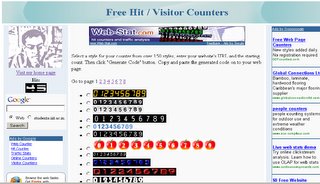
[ Edit : I uploaded the image in .png format(a lossless format) and file size was just 159kb. But blogspot automatically converted it to .jpg and now the text looks blurred :( Any idea how to correct that ? ]
Since last 2 days I had been trying to make a hit counter. The reason being that my original hit counter is now disabled. They say that I have used their counter for more than 6 months and I need to subscribe to payed service if I want to use it anymore. LOL at them. (I m referring to that free counter site as they/them coz I forgot its name. It was some flaxmconsultancy something.)
So , why would I pay when there are plenty of more free counter sites ;;) . But then I thought why not make myself a free counter site.
Take a look at my site. It has more than 150 designs to choose from ;;)
The counter on my blog is now from my free site :D
Though it was pretty simple but took me some time coz of a lot of problems. I didn't know how to join images of digits to make a number. So I decided to use iframe and display all images side by side so that they look as one. But the default size of the iframe was too large. I could not use the width, height attributes as they would change as the number of digits in ur count increases and this width, height code has to be in user's site(which I can't change). So then I went back to the image joining idea. But How to join image? Nirnimesh sir told that I could use ImageMagick for that. But 200(for those who r not from iiit, 200 is the server on which all iiitians have their accounts and are allowed to host websites) does not have ImageMagick. So now my problem became complex. I had to join the images on my local machine and then send it to 200 from where the user will get the count image. For that I had to create a page on my local machine that would return a joined image given the counter design and the count. Now that required setting up a http server. So I had to do a lot of work and finally all is done and working fine.
I have also added almost all possible google adsense products. Hope I would earn something from it :D
Similar change done here also. Removed "about me" section and added google ads, google firefox with toolbar referal and google search button.
Now another idea is wandering in my mind(is the english OK? I doubt.). Now I m planning to create a website that would allow people to access our intranet sites from outside IIIT. That means u can access ftp servers too and the documentations and software at 150. The idea is same as that used by several anonymous proxy servers. Users will query my site on 200(which is accessible from outside) for a intranet site. My site will fetch and display the queried site.
PS : ImageMagick is really cool. It allows you to operate on images directly from command line. Also it has a wrapper interfaces for python, perl, php, java, c/c++, etc.
PS 1: Python rocks. It has a module for almost everything. U need to write very little code to get ur work done.
 Technorati: technical, work, project, utilities, adsense, template


 Technorati:


