Sunday, November 12, 2006

Performancing For Firefox : Review and How to install

PS: Since IIIT Network does not seem to be coming back to normal, contrary to what is claimed here, so you can help me by trying out this.

Hey, right now I am blogging straight away from my browser using Performancing For Firefox or PFF in short.

Performancing for Firefox is a full featured blog editor that sits right in your Firefox browser and lets you post to your blog easily. You can drag and drop formatted text from the page you happen to be browsing, and take notes as well as post to your blog.

Get the PFF extension from here. Blogger beta users should install the latest version(1.3.5 Beta 3) from here or you will have troubles. Learn to set it up from here. Remember that Blogger beta users should give their google username(e.g. bla@gmail.com) and password when asked.

Now lets have a look at the features. This is the list of features that I got from performancing's home page.

Features

  • Full WYSIWYG and source editing
  • Save as Notes
  • Add all your various blog accounts
  • Technorati Support
  • Delicious integration
  • Trackback support
  • Draft support
  • Ping support
  • Image upload and FTP
  • Metrics stats
In order to copy the above features I just used another cool feature thats not mentioned in the above list. Just selected the feature list and did drag-n-drop. And it got placed here with all the formatting! Now lets see whether its also possible to drag-n-drop images.


O.. Yes. It works. Now I got to see whether it will get posted to blogger nicely or not. That I could only see after I post. So wait.[EDIT: Seems like it does not get uploaded. This is the only thing of blogger that PFF is unable to support.]

Now lets label it using the categories tab on right hand side and see whether its converted to blogger beta labels(after I post).[EDIT: Yes]
Also provides technorati tagging. No need of any bookmarklet now.

The bookmarks tab aka del.icio.us integration seems useless. It just provides link to all your bookmarks, which you can directly see in browser also. Ya... One use is that you can automatically bookmark all your post. Check the checkbox on option on right hand side for that.

Lets also try the trackback support. Lets put a link to my shaastra seo contest blog to check it. It is great boon to blogger users as blogger does not sends trackback pings.(EDIT: Does not seem to work, may be I missed something :( )

The pinging(not the trackback one) support is also cool. Blogger pings only weblogs.com. PFF allows you to ping more than 20 services using Ping-O-Matic, PingoAt.

One of the most important thing is that it provides more space to the editor window than what is provided by blogger. Also writing offline is much faster than editing in blogger's editor. May be thats why I could write such a long post :) [EDIT: One thing that I missed is editing of a posted blog. They claim somewhere that you can do that. But I couldn't.]

Technorati Tags: , , , , , ,

Friday, November 10, 2006

Ain't it cool?

Warning : This is a crap post ... so read it at your own risk....

Hey... I have edited my template and gave it a totally new look. The new blackish template looks fcuking cool to me. Hover your mouse at the bookmarking buttons at the bottom of each post. Such a nice effect. But I haven't seen any comments saying its good. Isn't it cool? Or is it that exams' tension is stopping people from reading blogs and dropping comments. Or is wireless LAN not working? Or is net not working? Or is slow net keeping people from reading blogs ?

Or is it the thing that I fear the most... its fcuking bad? No No. Please don't say that. I made it during the exams. Devoted(or wasted?) so much time on it during exams. Hey, I know my template is worthy of appreciation. At least its not copied. I mean I edited an existing template on blogspot to get to this. This is the original template:-

Mr. Moto Template

And here is current template(just for the sake of future reference):-

Black Beauty Template

I call this "Black Beauty".
Some of you might prefer the original one. But then thats one of the standard 30 templates that blogspot offers. And you will find hundreds of users using those same 30 templates. Having your own distinct template makes you feel happy.

PS: Nowadays I am posting so much crap ;) So from now on I will put a warning on every post :)
PS1: Firefox has updated its list of recommended addons (extensions).

Thursday, November 09, 2006

Image Storage

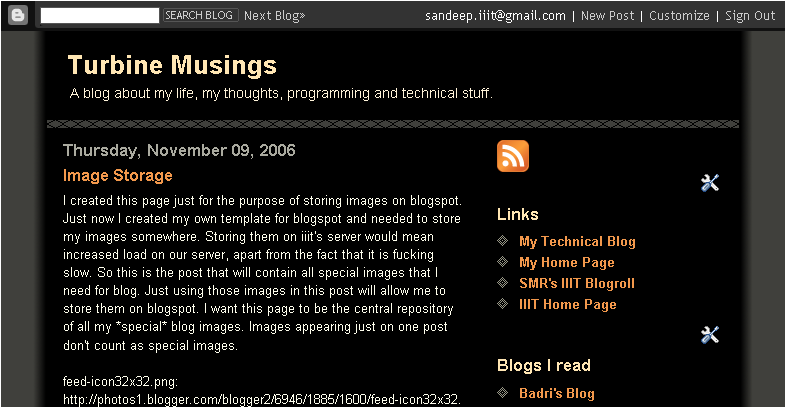
I created this page just for the purpose of storing images on blogspot.
Just now I created my own template for blogspot and needed to store my images somewhere. Storing them on iiit's server would mean increased load on our server, apart from the fact that it is fucking slow. So this is the post that will contain all special images that I need for blog. Just using those images in this post will allow me to store them on blogspot. I want this page to be the central repository of all my *special* blog images. Images appearing just on one post don't count as special images.

feed-icon32x32.png:
http://photos1.blogger.com/blogger2/6946/1885/1600/feed-icon32x32.png

headbotborder.gif:
http://photos1.blogger.com/blogger2/6946/1885/1600/headbotborder.gif

outerwrap.gif
http://photos1.blogger.com/blogger2/6946/1885/1600/outerwrap.gif

technorati.png
http://photos1.blogger.com/blogger2/6946/1885/1600/technorati.png

diamond.gif
http://photos1.blogger.com/blogger2/6946/1885/1600/diamond.gif

commentbug.gif
http://photos1.blogger.com/blogger2/6946/1885/1600/commentbug.gif

fav-normal.gif
http://photos1.blogger.com/blogger2/6946/1885/1600/fav-normal.gif

fav-hover.gif
http://photos1.blogger.com/blogger2/6946/1885/1600/fav-hover.gif

fav-reddit.gif
http://photos1.blogger.com/blogger2/6946/1885/1600/fav-reddit.gif

fav-digg.gif
http://photos1.blogger.com/blogger2/6946/1885/1600/fav-digg.gif

fav-netscape.gif
http://photos1.blogger.com/blogger2/6946/1885/1600/fav-netscape.gif

fav-delicious.gif
http://photos1.blogger.com/blogger2/6946/1885/1600/fav-delicious.gif

Thursday, October 19, 2006

Spamming under my name !!!

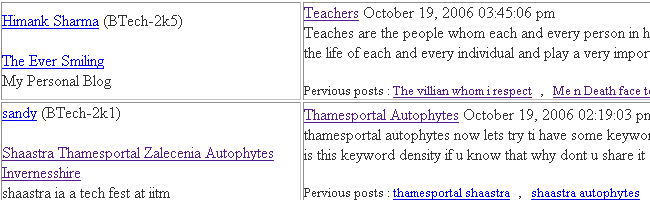
There is an entry in iiit blogroll with the name "sandy" that is not mine. That blog is contesting for the google seo contest. Now as soon as I stopped spamming, someone else is doing this under my name!!

UPDATE : That blog has been removed now. so here is the screenshot:-

Read on for the full story.....

For quite long I have been spamming in my splog(spam+blog) Shaastra Thamesportal Zalecenia Autophytes Invernesshire. This all I was (and I am) doing for the Google SEO contest being conducted by IITM as a part of its techfest Shaastra.
I also used comment spamming hoping to increase my PR only to find that most blog sites(wordpress, in my case) put the attribute rel="nofollow" in all links posted in comments. That attribute was started/proposed by google and basically means that google won't consider the link with this attribute for page rank purposes.
Then I slowly realised that I should not comment-spam. I also apolozised. Then I realised that I am also spamming blogroll by registering my splog there. It was today only that I asked smr to remove my splog from blogroll. And then....... I was surprised to see a similar splog on blogroll under my name!!

Well its not exactly my name, that guy's name is also sandeep, Sandeep Reddy. [Update: and he is with his friend ad srikanth]. They are students of IITM karshak engg college hyd. He is They are the one who are at top in this contest right from the beginning. Theirs blog is at atrieecs.seo.iitm.ac.in. Everyone else has tasted all positions in google search results, but THIS blog has never budged from the top. Congrats to them for that. But dude! don't spam under my name or under a name that is similar to mine. Anyways, you blog is going to be removed soon as you are not a iiit student. I have mailed smr.

PS: The guy, Sandeep Reddy, who is at top , is quite a bright student. See his webpage here.
PS1: If not me, someone with a similar name is winning this contest. I would love to see the top two positions going to SANDEEPs.... only problem is , it would have been better if I was the first one and he the second :)

TechnoratiTechnorati: , , , , , , , , ,

Thursday, October 12, 2006

New Look 2

Changed the template once again :)

TechnoratiTechnorati: , , ,

Wednesday, October 11, 2006

New Look

As you can obviously see, I have changed my template. Does it look better?
Of course, it looks better, atleast to me and that is all that matters. The old template had lots of images which made it very slow to load. This one is much faster to load.
I am planning to make my own template for blogger, which would look like one of those ajax sites. No ajax, but look would be look like that. Its not that only ajax sites could have that look, but normally such looks are present in ajax sites.

TechnoratiTechnorati: , , ,

Monday, September 25, 2006

Stupid Blogger/Blogspot

Blogger/Blogspot has now reached the limit regarding being stupid and non-professional. As many of you know, shifting to blogger beta has been a nightmare for most of the bloggers. If you don't know read my old posts here, here and here and also go and checkout google's blogger help group at google groups.
I am writing this post because today they did another stupid mistake. They disabled the old feeds url http://sandy007smarty.blogspot.com/atom.xml and instead started feeds on this new url: http://sandy007smarty.blogspot.com/feeds/posts/full for everyone(atleast all beta users). But before doing this or even after doing this they should have sent a mail notifying us of this, which they didn't. In fact, ideally, they should give us an option whether we want to shift our url or not. Because many people might have subscribed to the old feed and would have no way to know what happened to the old feed. They should additionally display a message at the old feed saying that it has been moved to a new url.
I got to know only when I saw that my new post was not coming on smr's blogroll. Instead my old post was being displayed there.
So, moral of the story, blogger sucks. I think I should move on to wordpress.

TechnoratiTechnorati: , , ,

Sunday, September 24, 2006

Strategy backfired?

Looks like my last post backfired. I tried to increase the page rank of my contest blog by providing inbound links to it from this blog. But instead *this* blog is coming earlier in the google search results than my contest blog. May be thats because my present blog is old and has relevant things which has already gathered a good page rank over time. So just the appearance of the Shaastra keyword made it come at top.
So now my new strategy is to provide more and more links to several pages of my contest blog so that google bot understands that thats a more important page than this one... thats why there are so many links to it from this page. It was not just one out of million links!
So Mr./Master/Miss/Mrs/Monieur/whatever google bot, do understand my concerns and help me. I am desperate.
And those fellow humans who are still reading this post, can u please leave a comment along with ur blog url if u would agree to get a few spam comments linking to my contest site.
It would be of great help to me.
Another thing is that I risk my blog being deactivated for illegal use of blogspot's resources. Yes... thats the reason the seo contest was put on hold for around 1 month. Earlier the organisers allowed any blog site for the contest. Then wordpress and blogspot deactivated several blogs citing misuse of their resources as the reason. So now organisers have created a ditto copy of wordpress on their own server. And everyone has to register there.
I hope this blog would not be deactivated because I m just blogging about my normal life. The actual contest blog is not this but on iitm's server.


TechnoratiTechnorati: , , , , , ,

Monday, September 11, 2006

Why is my blog always on top in IIIT Blogroll ?

There is some problem with my feed since I shifted to blogger beta. The blogger beta atom feed was not getting correctly parsed by SMR's IIIT Blogroll. It seems MagpieRSS (the software used by blogroll to parse feeds) is not comfortable with the newer versions of Atom Feeds. So I decided to shift to RSS feed. But Blogger would allow RSS feeds only to paid customers. So I created an account at http://www.feedburner.com/ which takes my atom feed provided by blogger as input and publishes an RSS Feed. And I asked blogroll to subscribe to this feed.
Now my blog feed started getting parsed, but time is not correct. Blogger publishes the time in this format 2006-09-11T01:26:52.069+05:30 , i.e GMT +05:30. Now feedburner keeps the same time but changes to 05:30 to -05:00 . So a blog written at 1:26:52 +5:30 becomes 1:26:52 -5:00.
Now blogroll rightly adds 10:30 minutes to this time to get the IST time which becomes 11:56:52am.
So my blog comes to top and remains there atleast till 11:56am.
The problem is with feedburner(changes +0530 to -0500). Any solutions ??

TechnoratiTechnorati: , , , , ,

Saturday, August 19, 2006

Technorati Tags Bookmarklet adapted for blogspot and blogger

Inspired by Rakesh's Bookmarklet (originally Lorelle's), I came up with a technorati bookmarklet for blogspot and blogger.com users.
Technorati tags bookmarklet is a Firefox bookmarklet to tag ur blog posts. First created by Lorelle and later modified by freehogg and then again modified by Rakesh. Veterans can see the modified code below and newbies first read "How to create bookmarklet" and "How to use it" further down.
-----
javascript: ( function() { /* Technorati Tag Book Marklet 0.3 Created First By: Lorrell <http://lorelle.wordpress.com > for wordpress. Last Modified By: Rakesh <http://rakeshkumar.wordpress.com > for wordpress. Adapted for Blogspot By : Turbo <http://sandy007smarty.blogspot.com > */ var a=''; var t=prompt('Enter Tags separated by commas',''); if(!t) return; var tr=t.split(','); a+='<p><img id="technorati_img" src="http://photos1.blogger.com/blogger2/6946/1885/1600/technorati.gif" alt="Technorati" /><strong>Technorati: </strong>'; for(var i=0;i<tr.length;i++) { tr[i]=tr[i].replace(/^\s+/,""); tr[i]=tr[i].replace(/\s+$/,""); var tag_text=tr[i]; tr[i]=tr[i].replace(/\s+/g,"+"); if(i > 0){ a+=', '; } a+='<a href='+unescape('%22')+'http://www.technorati.com/tag/'+tr[i]+unescape('%22')+' rel='+unescape('%22')+'tag'+unescape('%22')+'>'+tag_text+'</a>'; } a+='</p>'; prompt('Copy this html code, Press OK, Then Paste into your blog entry:',a); } )()
-----
Its character by character same as Rakesh's version, except for the image url. I changed the url to a blogspot url to make it a blogspot bookmarklet in true sense. That is, blogspot won't have to go to wordPress for that image. Although I have not tried, Rakesh's original version should also work without any problems, unless blogspot specifically blocks wordpress urls (which it does not do now atleast).
Following FAQs have been shamelessly copied from Rakesh's post :-
FAQs
Q1. How to create bookmarklet?
Ans: Copy the above script and paste it to Firefox’s address bar. Drag and drop it to bookmarks toolbar. Right click on it, go to properties and verify the location.
The location should contain the above script. Change the name to something related like “Technorati Bookmarklet”.

Q2. How to use it?
Ans: Just click on the bookmark. A dialogue box will open. Enter your tags in it, seperated by commas. (spaces are allowed within tags). It generates
the html code for tags. Copy and paste it in your blog post.

Q3. Why Technorati Tags?
Ans: A simpler explantion is that it adds meaning to the information that you are providing (i.e. your post). Tags work both ways, it helps sites like Technorati
to organize the contents properly and on the other hands it increases your reach to a broader audience.

Q4. But blogspot already has labels?
Ans: Yes, a recent feature. Those who still use old templates don't have the labels feature. Also its simply good to have technorati tags. Isn't it?


TechnoratiTechnorati: , , , , , , ,

Enabling Adsense in the new blogger/blogspot templates

Those who are wondering what is this fuss about new blogger, read my previous post or visit this.
Those who have already added the javascript code and still their adsense is not working, read from step 6. Others see all steps.

1. At the dashboard(the page that opens when you login) , click on settings :-
2. Then go to template tab. If you have not yet moved to a new template(beta template) , do it now as mentioned here .
By default, page elements tab is open.
3. Now click on "add a element" link.

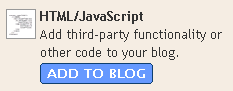
4. A popup will open up showing various kind of page elements. Select the one named "HTML/Javascript".

5. You will be presented with a form. Don't write anything in the title text box because anything that you write here will appear above the adsense thing and will look very bad. In content box paste your adsense code.
[UPDATE(27 Sept, 2006): Blogspot has removed the bug with javascript. So step 6 is no longer required. Continue from step 7.]
6. Now you need to understand a fact about javascript. Most of the javascript codes are included inside comments(HTML comments) so that javascript incompatible browsers are not confused. For example :-
<script type="text/javascript"><!--
Some javascript code
//--></script>
What you need to do is to just remove the red things(comments) in above code. Remove only "<--" and "//-->" and not the matter in between them.
7. Click on save changes button
8. Done!!!
Note that this thing will create problems in javascript incompatible browsers. But then you need adsense, so thats the way.
Also note that step 6 above is required because beta blogger seems to have some bug. Once that bug is removed no need to do step 6. FYI, as of now, step 6 is required for any javascript code whether it is of adsense or not.

Friday, August 18, 2006

Finally blogger adds tag support

Finally blogger acts, but not before it lost a hell lot of customer base. I have seen many iiitians switch to wordpress citing the unavailability of tagging(categorizing) feature. Anyways its good to see the new features. A number of cool features have been added:-
1. Category/tags feature has been introduced with the name labels.
2. No need to republish anymore.
3. Site feed for comments also.
4. Easy to change the layout - drag and drop - too cool - a must try.
5. Blogger can email you whenever you write a new post... can create a kind of archive, just in case u delete ur blog by mistake.
etc.etc.
Also now you have the option to integrate your blog with google accounts.
You may miss the raw HTML template editing. But you can still do most of those editings using HTML/Javascript page elements that the new template provides. And obviously you have to move to the new template to avail these features(including categorization).
The catch : Google adsense is not working as of now :( ... anyways its useless ... generated just $2.5 in around 1 year.
EDIT : I have found a workaround. See this post.
Blogger is quite late ... in nirnimesh's words - working in damage control mode. Still, better late than ever. I also wanted to switch to wordpress, but didn't coz of laziness.

Tuesday, August 16, 2005

My Second Blog

Hey, I assure u my netxt blog's title won't be "My Third Blog". I wasn't getting any nice title .. so i used this one. So this my second blog only ... and i m out of thoughts. I dont know what to write.
Lets start with CZ. As u might have guessed, i won't have written abt CZ if i hadn't played it well today. Today i played really well and thrashed all others. I payed de_dust_2 and awp .Today i was thinking abt doing my ITWS assignment( shelve address program thru web based interface). But i couldn't do it because of CZ. Sill i searched somethings on Gooole and i got a site which provides some custom templates to u..... well i didn't like it much.. but u can check it out
..here.
Hey man , i dont know what to write ..... bye

TechnoratiTechnorati: , , ,

My first blog

Hey, today i read several people's blogs ( startes with smr's ) and finally shifted to the "BLOGGERS'S GROUP" from the group of "NON BLOGGERS". SMR's blog is really nice and it inspired me. Earlier, i used to always comment on one of my friends(Bharat) that only chutiya's blog... but now ... what r u thinking ??? .... i m not a chutiya... I have changed . I beleive :-
"CHUTIYAS DON'T BLOG".
Ok enough for today .. as i have already wriiten a lot of comments on Bharat's, sikka's, etc blogs.
So BLOGGERS JINDABAD!!!


Ps:
Hey no offence meant. If u dont like , don't read my blogs in future.

TechnoratiTechnorati: , , ,